
Vidu AI has built a loyal following among creators who want fast, affordable AI video without a steep learning curve. Built by Shengshu Technology, a Beijing-based startup with roots in Tsinghua University research and backing from major investors, vidu studio ai has grown into a widely used generator for short-form clips, anime-style animation, and template-driven social content.
Vidu AI is one of the platforms attracting attention, offering several ways to control characters, scenes, images, and motion. This review looks at what Vidu actually delivers in 2026, where it falls short, and how it compares to MagicLight AI for creators who need more than quick clips.
Part 1. What Is Vidu AI?
The vidu ai free is an AI-powered image and video generation platform that can create videos from text prompts, images, reference images, and start-and-end frames. Its current tools include text-to-video, image-to-video, reference-to-video, multi-frame generation, lip sync, digital humans, video replacement, and video extension.
Key Features
- Vidu can transform a still image into a moving video using a text prompt describing the desired motion. Users can also control settings such as duration, resolution, video ratio, and movement amplitude depending on the model.
- Creators can provide reference images to guide the appearance of subjects or scenes. Some current workflows support multiple reference images, helping maintain subjects and visual elements across generated videos.
- Vidu can generate videos directly from written prompts. Users can describe a scene or concept and select video settings such as duration, resolution, and motion.
- Vidu allows creators to provide beginning and ending images and generate the transition between them.
- Vidu also provides lip-sync functionality, digital-human generation, video replacement, video extension, and multi-frame generation.
Pros
- Fast AI video generation
- Multiple creation methods
- Strong image-to-video tools
- Reference-based consistency
- Flexible video controls
Cons
- Free tier exports carry watermarks and lower resolution
- Full commercial use requires a paid plan
Part 2. How to Use Vidu AI?
Step 1: Open Vidu AI and Log In
Go to the vidu ai studio website and click Try Vidu or Create Now. Sign up or log in using your Google, Facebook, or email account. After logging in, check your available credits on the dashboard.

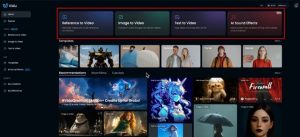
Step 2: Choose Your Video Creation Method
Choose the option that matches your idea. You can use Text to Video by writing a prompt, Image to Video by uploading a picture, or Reference to Video by adding reference images.
Step 3: Set Your Preferences and Generate
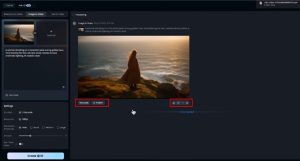
Choose your preferred AI model, video duration, resolution, and aspect ratio. For example, you can select 1080p and a 9:16 ratio for vertical videos. Then click Create or Generate and wait for your video.

Step 4: Preview, Edit, and Download
Preview your generated video and check the results. If you want to change the motion or overall result, modify your prompt and generate it again. Once you are satisfied, click the download button to save your final video.
Pros of Vidu AI
-
Highly Personalized Sales Videos
Vidu lets sales teams personalize videos with prospect names, company names, logos, websites, brand colors, languages, and specific use cases for more relevant outreach.
-
Bulk Video Generation
Vidu can generate personalized videos in bulk using CSV uploads, integrations, or its API, helping sales teams create large numbers of customized videos efficiently.
-
Dynamic Video Backgrounds
Vidu can generate personalized video backgrounds based on prospects’ websites or LinkedIn profiles, while also allowing teams to build their own dynamic pages for outreach.
-
AI-Powered Product Demos
Vidu can integrate product animations into personalized video templates, allowing sales teams to demonstrate their products in customized videos designed around individual prospects and use cases.
Cons of Vidu AI
-
Mainly Designed for Sales Teams
Vidu is primarily positioned as an AI personalized video platform for sales outreach, making it less suitable for creators seeking general storytelling, animation, or long-form entertainment video production.
-
Requires Recorded Video Content
Vidu’s workflow involves recording videos and then generating personalized versions from that recording, so users need to create suitable source videos before producing customized outreach content at scale.
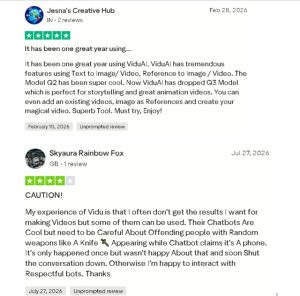
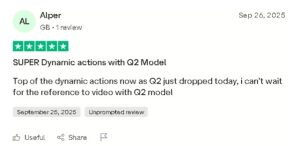
User Reviews
Part 3. Try Magiclight AI: The Next-Level Choice Over Vidu AI
The ai video generator vidu is useful when the primary goal is generating individual AI video clips from text, images, or references. However, creators who want to go beyond isolated clips may need a more complete production workflow. This is where MagicLight AI takes a different approach. MagicLight is designed as a complete AI video production system rather than simply a clip-generation tool.
Key Features
-
Long-Form Video Generation
MagicLight supports videos of up to approximately 50 minutes in its Story to Video workflow. This makes it suitable for longer storytelling content, educational videos, documentaries, interviews, and episodic series.
-
Complete Idea-to-Video Workflow
MagicLight can take creators through idea development, script generation, storyboarding, character creation, visual style selection, and final video production. Its MagicLight Agent provides a conversation-style workflow also.
-
Consistent Characters
MagicLight maintains character consistency across multiple scenes. Creators can create or select characters and use them throughout longer stories, helping establish a recognizable visual identity.
-
AI Storytelling and Scene Planning
MagicLight automatically develops narrative structures, scene arrangements, and story progression. Instead of manually planning every scene, creators can start with an idea and let the system build the story structure.
-
Nano Storyboard
MagicLight’s Nano Storyboard provides more detailed control than a traditional storyboard. Instead of describing one shot with a single image and a simple description, Nano Storyboard breaks a shot into multiple micro-steps, detailed actions, and timeline control before generating the dynamic video.
| Vidu AI | MagicLight AI | |
| Best for | Short clips, social content, concept testing | Long-form, script-driven narrative video |
| Max output length | Up to ~16 seconds per generation | Up to 50 minutes in one continuous project |
| Character consistency | Strong within a single short clip via multi-reference | Designed to hold consistency across an entire long video |
| Audio | Native synced dialogue, music, and sound effects (Q3 model) | Voice cloning and lip sync built into the storytelling pipeline |
| Storytelling tools | Templates and remix effects for quick starts | Full scripts, story templates, and structured narrative flow |
Conclusion
Vidu AI is a solid, fast choice for short clips, quick concept tests, and social content where a few seconds of consistent, well-rendered motion is all you need. But if the goal is an actual story- a video that holds a narrative, characters, and voice together for minutes rather than seconds. The MagicLight AI is built for that job in a way Vidu simply isn’t designed to do.
FAQs on Vidu AI
1. What Is Vidu Ai Image To Video Feature?
The vidu ai image to video feature lets users upload a still image and describe the movement they want through a prompt. The system then generates a video based on the image and requested motion. While MagicLight also supports Image to Video.
2. Can Vidu AI Turn Photos Into Videos?
Yes. vidu ai photo to video feature can turn a photo or other still image into a short AI-generated video. Users can upload the image and describe the desired movement, camera behavior, or scene development. MagicLight can also animate uploaded images through its Image to Video workflow.
3. Is Vidu AI Suitable For Beginners With Zero Video Creation Experience?
Yes, Vidu can be accessible to beginners because its workflows are based around straightforward inputs such as text prompts, images, and references. Its website provides a simple workflow: enter a prompt or upload images, customize video settings, and generate the result.
4. Is Vidu AI Better Than Other Video Generators?
There is no single answer because different AI video generators focus on different workflows. Vidu is particularly useful for image-to-video, reference-to-video, text-to-video, start-and-end-frame generation, and other clip-generation workflows. MagicLight takes a broader approach by combining storytelling and production.
5. What Are The Main Limitations Of Vidu AI 2026 For Video Production?
Clip length is capped at around 16 seconds even in extended modes; the free tier includes watermarks and reduced resolution, and it offers limited native tools for captions or multi-scene storytelling. While MagicLight AI addresses these gaps directly with long-form generation up to 50 minutes and built-in tools.
Leia + sobre tecnologia e ciência